
If you’ve ever wondered how to end a conversation on Swept Dating, you’re not alone. Not every match turns into something lasting. Sometimes you move off the app. Sometimes the vibe fades. Sometimes you need to protect yourself.
Swept Dating was built for intentional dating. That includes giving you a clean, respectful way to close conversations without ghosting, without awkwardness, and without confusion.
Here’s exactly how it works.
Why Ending a Conversation Matters
Most dating apps leave conversations hanging. Threads pile up. People disappear. Nobody knows where things stand.
Swept takes a different approach. When you formally end a conversation, you:
- Close the messaging journey clearly
- Reduce ghosting behavior
- Keep your inbox organized
- Help improved community trust and safety
Intentional dating includes intentional endings.
Step By Step Closing A Conversation
Step 1: Open the Thread Menu
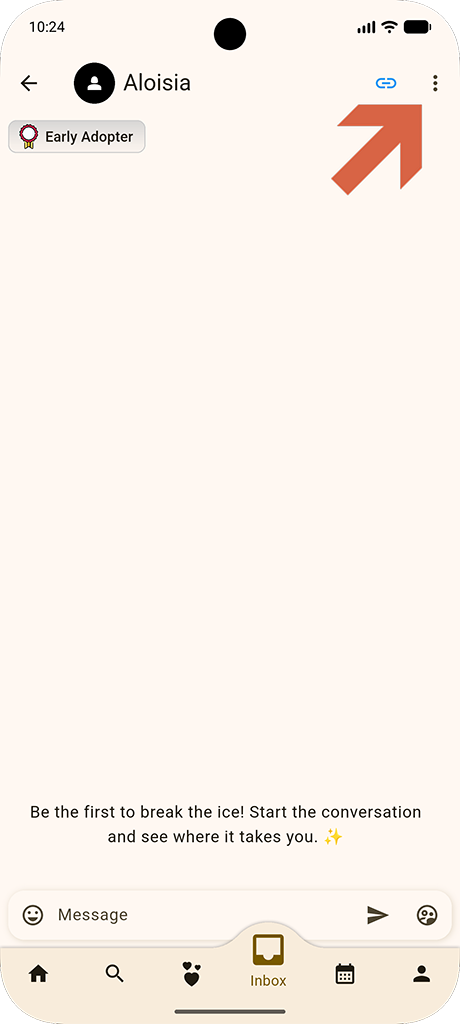
Open the conversation you want to close.
In the upper left corner of the thread, you’ll see the thread menu icon. Tap it to open the conversation options.
This is your control center for managing that specific chat.
Step 2: Tap “End Conversation”
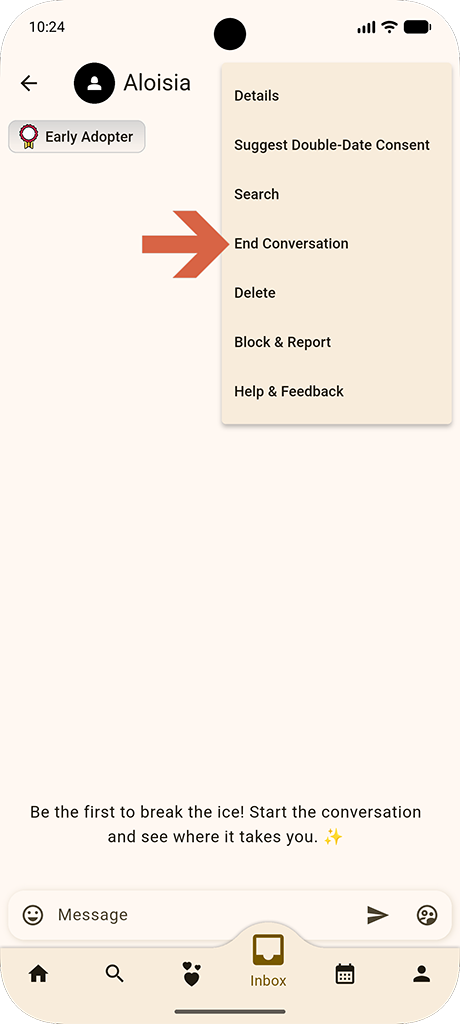
From the menu, select End Conversation.
This action moves the conversation out of your active inbox and into archive status. Depending on the reason selected, it may also trigger internal moderation and safety reviews.
Step 3: Select a Reason and Confirm
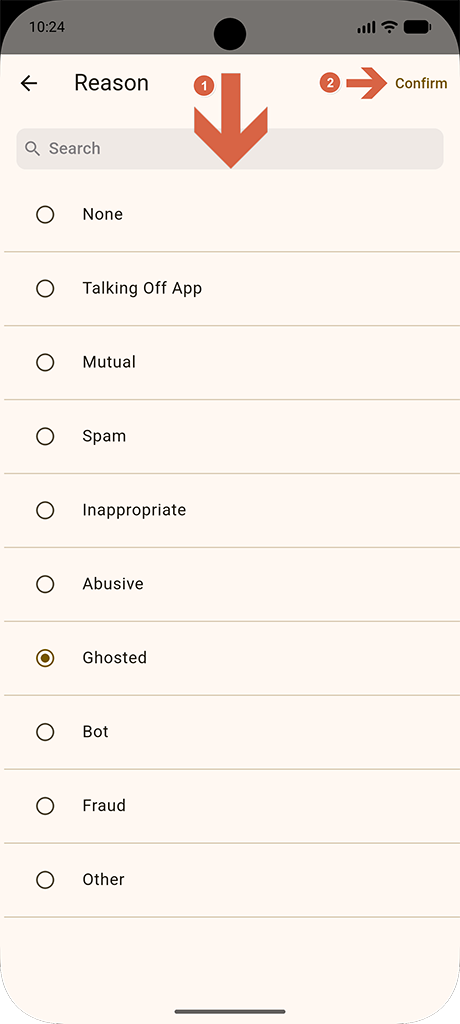
You’ll see a list of reasons to choose from: None, Talking off App, Mutual, Spam, Inappropriate, Abusive, Ghosted, Bot, Fraud, Other.
Here’s what each means:
What Each End Conversation Reason Does
| Reason | Description |
|---|---|
| None | You simply want to close the conversation. No additional action required. |
| Talking off App | You’ve exchanged numbers or moved to another platform. This helps keep your Swept inbox clean. |
| Mutual | You both agreed to part ways respectfully. |
| Ghosted | The conversation stalled and never resumed. Swept Dating tracks ghosting patterns to promote accountability. |
| Spam, Bot, Fraud | These options help protect the community. Selecting one flags the account for review. |
| Inappropriate or Abusive | These trigger a moderation review. Swept takes safety seriously, and repeated violations can lead to suspension. |
What Happens After You End It?
Once you end a conversation:
- The thread moves into an archived state.
- It no longer appears in your active inbox conversations.
- If you selected a safety-related reason, the system may review the account and conversation.
- Your ghosting metrics stay accurate and transparent.
Swept Dating was designed to reduce ambiguity. Conversations either move forward or close intentionally.
When Should I end a Conversation?
Here are some common situations where you may want to end a conversation:
- You feel no connection.
- The other person stops responding.
- You move into a committed relationship.
- You’re taking a break from dating.
- The conversation violates community standards.
Respectful Dating Includes Respectful Exits
According to research from the Pew Research Center, nearly 30 percent of U.S. adults using dating apps report experiencing harassment or unwanted behavior. Clear exit tools matter.
Swept’s approach combines:
- Structured closure
- Built-in moderation
- Ghosting accountability
- Transparent reporting options
Keep Your Dating Intentional
Swept Dating was built differently. Conversations are meant to move forward with purpose or close with clarity.
If you haven’t experienced intentional dating yet, now is the time.
Download Swept Dating today and take control of how you connect, communicate, and close conversations.